










Performance Center: Better practice begins with better feedback
Use Strokes Gained scoring to understand your game.
 Trackman Editorial Team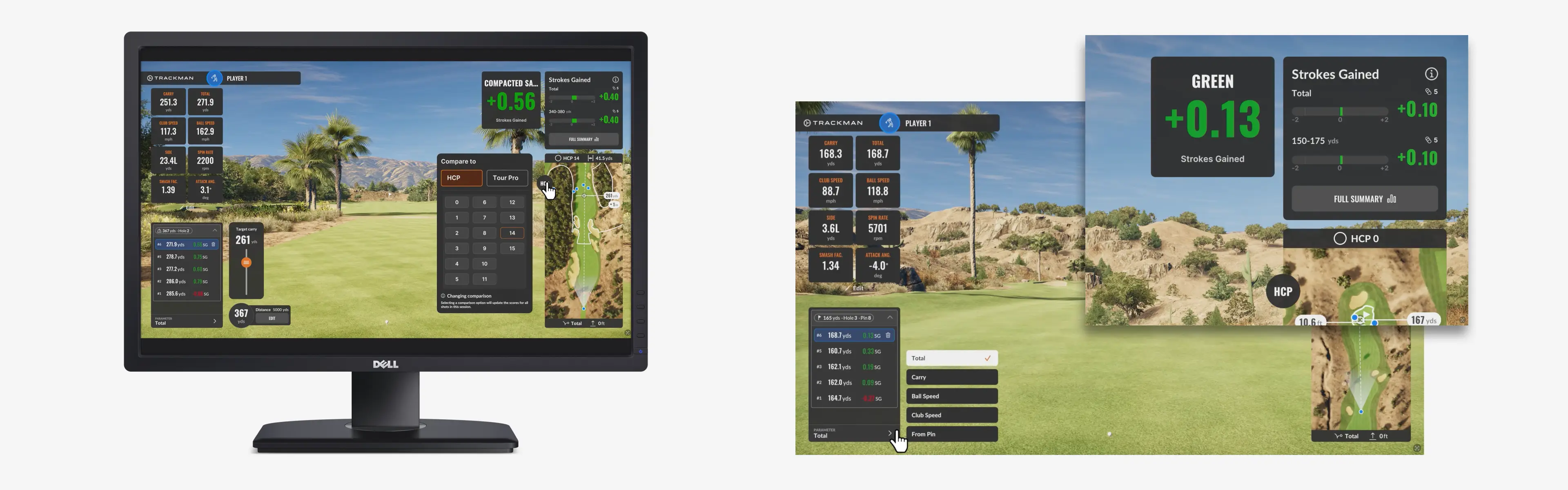
Performance Center in Trackman Performance Studio (TPS) is built for golfers who want more from practice than a soggy glove and the general feeling that things are moving in the right direction.
“When you're on the range, sometimes shots don’t count as much if you get into this routine of just banging balls out there,” Trackman Co-founder and CTO Fredrik Tuxen says. “That’s exactly the problem Performance Center was designed to solve.”
Now available at both Trackman Range and simulator facilities, Performance Center allows you to improve your situational shot execution with Strokes Gained scoring feedback.
Watch the video below to learn how it works.
Available in the Practice section of TPS, Performance Center gives you a dedicated environment for situational practice, instant feedback and true performance benchmarking. It can be used indoors or outdoors, and it helps you work on the shots that have a direct impact on scoring — especially approach shots and tee shots.
Instead of practicing without a clear outcome, you can set up focused sessions based on the type of shot you want to train. For approach shots, you can choose a specific yardage or distance range, select green layouts and pin locations, or randomize the setup to create more variety. For tee shots, you can practice on randomized holes with different shapes, hazards and levels of difficulty, or choose a specific hole shape based on the shot you want to develop.
Throughout the session, Performance Center gives you continuous Strokes Gained feedback against your chosen benchmark, including tour pros or different handicap groups. After each shot, you can review key data tiles, carry or total distance, target reference, Strokes Gained result, landing position and dispersion.
The mini-map adds another useful layer, helping you see depth and distance more clearly than the main tracer can alone. In Tee Shot mode, the Strokes Gained zero zone gives you a visual reference for which shots gain strokes and which shots lose strokes based on where the ball finishes.
After your session, the Summary page brings everything together with per-shot details and broader insights, helping you identify strengths, weaknesses and the areas where focused practice can make the biggest difference.
For coaches and players, it all adds up to more meaningful feedback. As coach Hugh Marr says, “[Performance Center]’s great for training players from a strategic perspective, getting them to understand where to aim for certain shots to certain flags.”
Watch the full explainer video to see how to set up Performance Center, customize your session and start turning practice into measurable progress.
Further reading
Explore all TPS features → Your guide to Trackman Performance Studio
Analyze your swing data → Shot Analysis: See more in every swing